



Chroma Explorer: An Open Source, Cross-Platform App for Exploring Chroma Vector Databases
Here at SagaIQ, we’re thrilled to give back to the AI community with the release of Chroma Explorer, our open-source desktop application built to support and empower those working with Chroma. We created Chroma Explorer with you in mind - developers, data scientists, and AI researchers - to make navigating your vector databases intuitive and efficient. This tool is our way of saying thank you, making it easier to explore, search, and interact with Chroma, so you can focus on what truly matters: innovation and discovery.
Why We Built Chroma Explorer
As the adoption of Chroma has grown, in combination with our extensive use of the technology, we saw the need for a tool that abstracts away the complexity of managing and querying vector-based databases. While Chroma is a powerful open-source vector database, it’s often challenging for users to visualize and interact with their data without a lot of manual effort. That’s why we created Chroma Explorer - to enable you to intuitively explore your Chroma databases.
Key Features
- Cross-Platform Compatibility: Available on macOS, Windows, and Linux, Chroma Explorer ensures that no matter your operating system, you can connect to and work with your databases.
- Flexible Authentication Options: Whether you’re connecting to an unauthenticated, username/password-protected, or access token-protected database instance, Chroma Explorer supports all three methods, providing flexibility for different use cases.
- Database Exploration Made Easy: View collections within a database and dive into it’s documents and their chunks.
- Document Chunk Aggregation: Chroma Explorer re-builds source documents on-the-fly from the ingested chunks stored in Chroma, providing you with a Document-level view of your data, including any associated metadata.
- Search Across Collections: Instantly search for content across collections and document chunks using our streamlined interface, enabling you to validate that your chunking/ingestion strategies are working as expected.
- Breadcrumb Navigation: Seamlessly move across collections, documents, and chunks using the intuitive breadcrumb at the top center of the application.
- Open Source and Extensible: Built using Electron and React, Chroma Explorer is designed for developers, by developers. We welcome contributions and encourage you to check out our GitHub repository for more details on how to get involved.
Getting Started
Chroma Explorer is currently built using node v22. To build and run Chroma Explorer locally, follow these steps:
- Clone the repository:
git clone https://github.com/SagaIQ/chroma-explorer.git cd chroma-explorer - Install dependencies:
npm install - Run Chroma Explorer:
npm run start
Once the app is running, you can connect to any Chroma instance and start exploring your data immediately.
Chroma Explorer Walkthrough
Viewing Collections

Opening a collection takes you to the documents page, where you can quickly see all documents within a collection. Each document card also displays the number of chunks that comprise the document. The breadcrumb at the top of page is also updated to display both the Chroma instance that is currently connected, and the collection that is currently selected. Use the breadcrumb to navigate back to the list of all collections.
Viewing Documents in a Collection
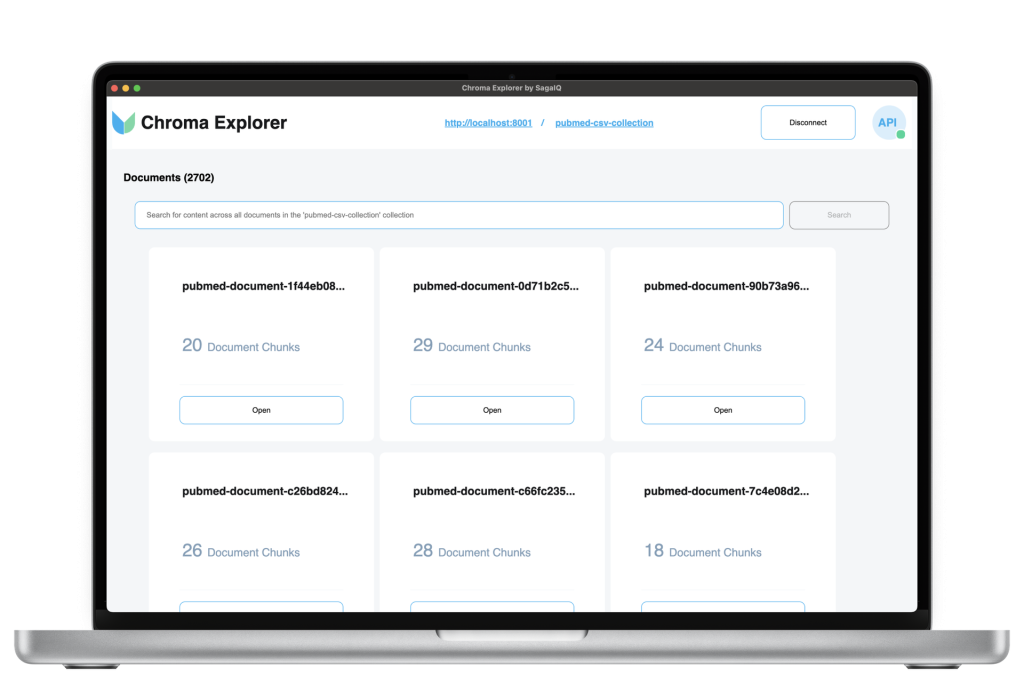
Opening a collection takes you to the documents page, where you can quickly see all documents within a collection. Each document card also displays the number of chunks that comprise the document. The breadcrumb at the top of page is also updated to display both the Chroma instance that is currently connected, and the collection that is currently selected. Use the breadcrumb to navigate back to the list of all collections.
Viewing Chunks of a Document
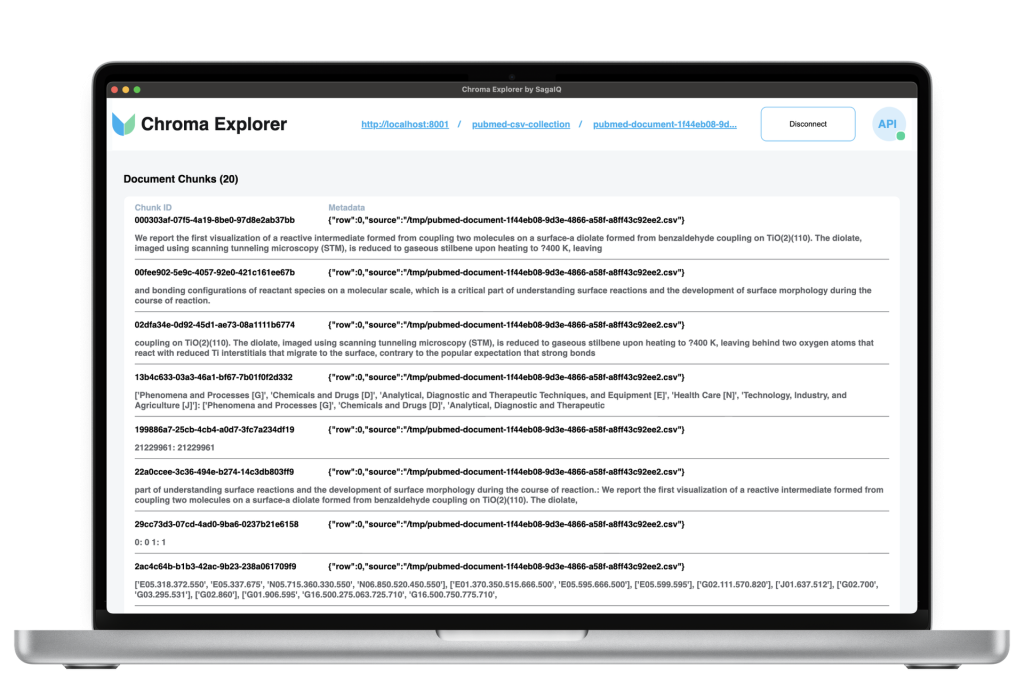
When you open a document, you’re taken to its dedicated page, where you can easily view all the chunks that make up the document. Here, you can review and validate your chunking strategy, seeing precisely how your data is processed into Chroma. You’ll also find details on text splitting, word and page preservation, and related metadata. And notice the breadcrumb navigation has been enhanced to show the current document, allowing you to quickly return to the selected collection or view all collections in the connected Chroma instance.
Searching for content across all Documents in a Collection
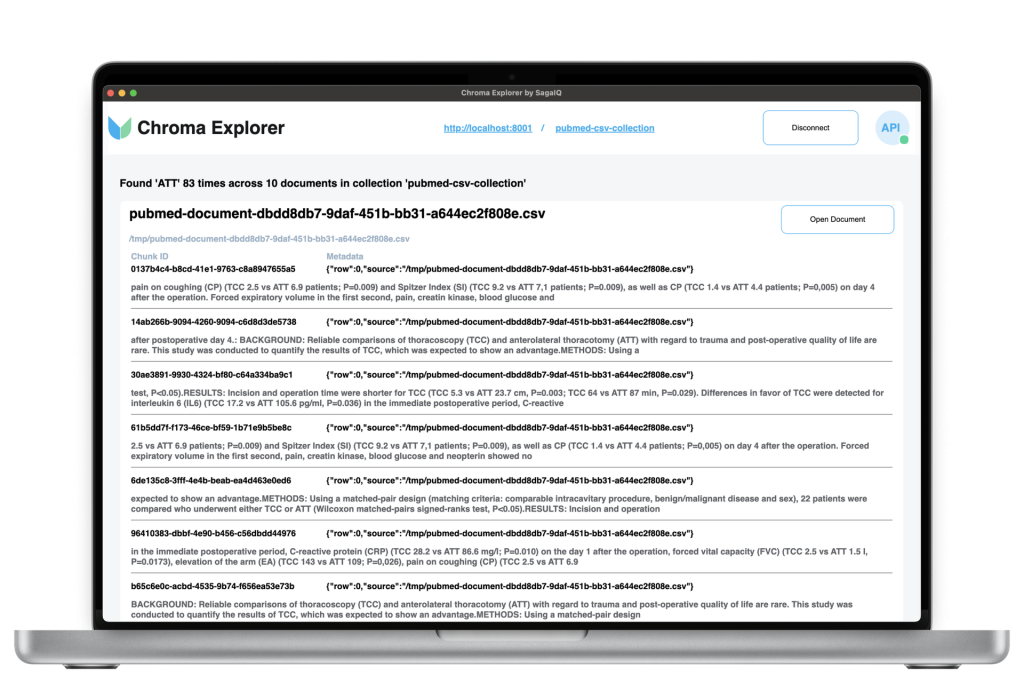
On the collection page, you can search content across all documents. The search results are dynamically compiled, gathering relevant document chunks and grouping them in a format similar to each original document. You can view chunk details, metadata, and easily navigate to a specific document by clicking the “Open Document” button for even more details.
Join the Community
Chroma Explorer is open source under the Apache 2.0 license, and we’re excited to see what the community does with it. Whether you want to contribute to the codebase, suggest new features, or report a bug, we’d love to hear from you. Join us on GitHub to help make Chroma Explorer even better.
AI, on your terms™